Today you will double click, drag, and find the home keys on the keyboard.
explorers90 min
Meet the computer
Double click, drag, and first keys
Today you will double click, drag, and find the home keys on the keyboard.
Story3 min
Laptop block: Ocen and the two knocks
Akello visits Ocen’s house. The gate is closed.
She knocks once. Nobody comes. She knocks twice, fast. Ocen runs out.
Ocen says: Two quick knocks mean someone is here.
Ocen says: Computers are like that. One click says, this one. Two quick clicks say, open it.
Did you know?2 min
Did you know? Chimpanzees use tools
Chimpanzees live in the forests of Uganda. They use tools. A chimpanzee can chew a leaf into a soft sponge. It dips the sponge in water and sucks out the water. Chimpanzees also use sticks to get insects out of holes. Young chimpanzees learn by watching others. They practise many times. Careful hands and a lot of practice are a good team.
Which job do your hands do carefully every day?
Remember4 min
Laptop block: Remember
Answer with your pair. Whisper first.
What does one click say?
Which comes first, point or click?
How do you close a window?
What comes first: wipe hands, or carry the laptop?
Learn8 min
Laptop block: Double click, drag, and the keyboard
Double click. Click twice, fast, in the same place. It opens things.
Drag. Hold the left button down on a thing. Slide the pointer. Let go where you want it.
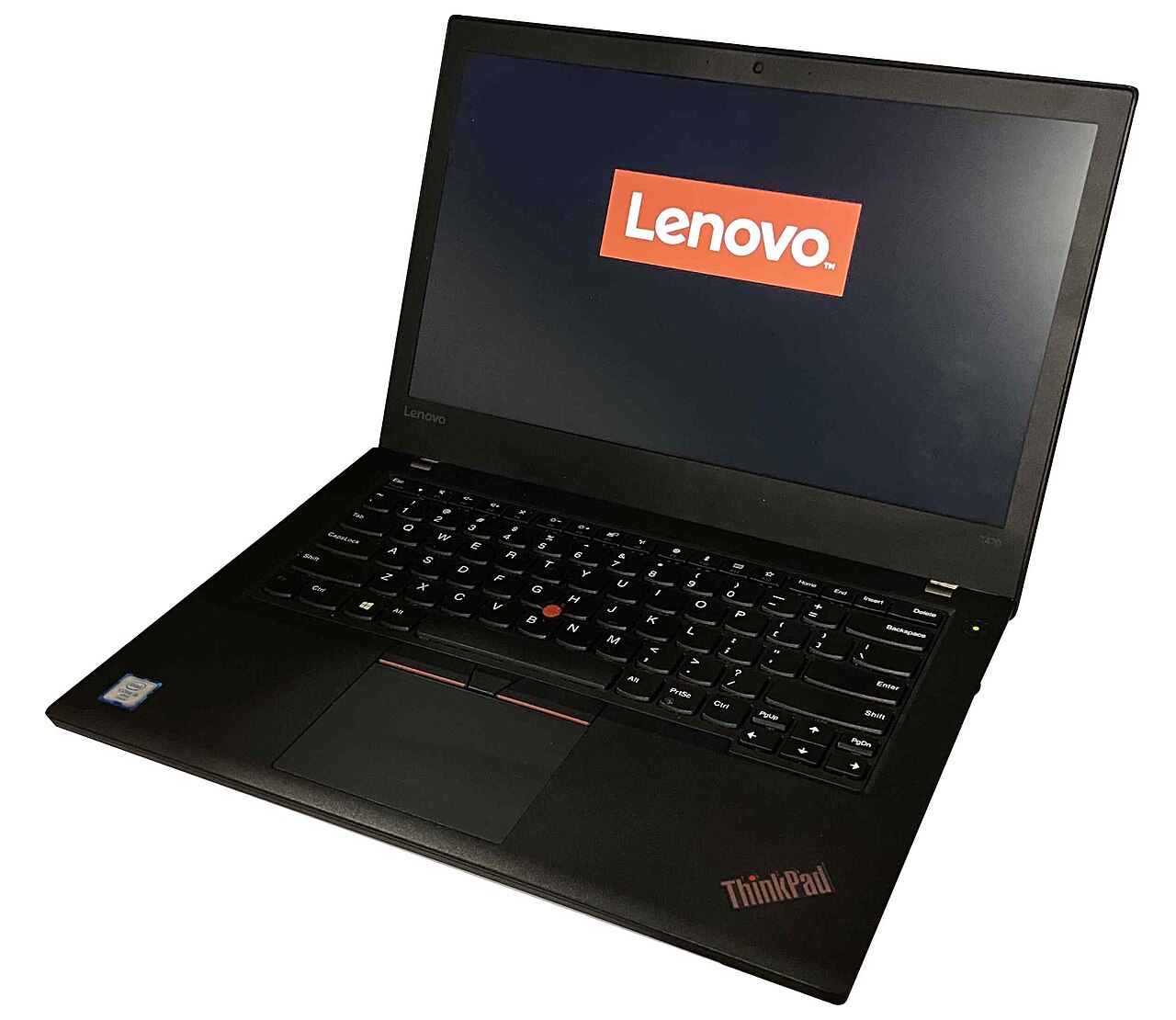
The keyboard. It has rows of letters. Three keys to know today:
Space bar. The long key at the bottom. It makes a space between words.
Enter. It starts a new line.
Backspace. It rubs out the letter you last wrote. On a Mac it may say delete.
Find the long space bar, Enter, and Backspace on this keyboard.Photo: NickW1129, CC0
CheckQuestion 1 of 4
What does a double click do?
On the computer9 min
Laptop block: Mouse trainer, double click and drag
Work in pairs. Driver uses the hands. Navigator uses the eyes and the voice.
Play 3. Double click. Two fast clicks on the mango.
Mouse trainer
Click the mango two times, fast.
Play 4. Drag. Hold the left button. Pull the mango into the basket.
Mouse trainer
Hold the left button down on the mango and pull it into the basket.
On the computer9 min
Laptop block: Key finder, home keys
Swap. Find the keys with the Key finder.
Play 1. Home keys. Find the key. Press it.
Key finder
Feel the small bumps on F and J. They help your fingers find home.
On the computer5 min
Laptop block: Space bar, Enter, Backspace
The mentor opens a text program for you. It is a blank page.
Press a key and see the letter.
Press the space bar. Press a letter.
Press Enter. The cursor goes to a new line.
Press a wrong letter. Press Backspace to rub it out.
The cursor is the small blinking line. It shows where the next letter will go.
Challenge5 min
Laptop block: Challenge
Choose one challenge. Try the next one when you are ready.
Bronze
Find the space bar, Enter, and Backspace. Touch each one and say its name.
Silver
Type your first name. Use Backspace if you make a mistake.
Gold
Type your first name. Press the space bar. Type your last name. Press Enter. Type the name of your school.
Learn15 min
Paper block: Worksheet 1, the paper keyboard
Now you work at your table. Today’s table leader leads the table.
Do Worksheet 1. Colour the home keys. Find your name.
Worksheet 1: The paper keyboardName:
This is a keyboard on paper. It has three rows of letters.
Q
W
E
R
T
Y
U
I
O
P
A
S
D
F
G
H
J
K
L
;
Z
X
C
V
B
N
M
,
.
/
Space bar
(a long key at the bottom)
Enter
Backspace
(new line)
(rub out)
1. Colour the home keys yellow: A, S, D, F, J, K, L, and ;
2. Colour the space bar blue. Colour Enter green. Colour Backspace red.
3. Write your name in the boxes. One letter in each box.
4. Circle each letter of your name on the keyboard.
5. Which row are most of your letters in? Top, middle, or bottom?
No computer12 min
Paper block: Worksheet 2, my fingers
Do Worksheet 2. Trace your hands. Write the home key on each finger.
Then play Tap and say with a friend.
Worksheet 2: My fingers on the home keysName:
1. Trace your left hand. Trace your right hand. Write the home key on each fingertip.
2. Fill the table. Use the word box.
Word box: A, S, D, F, J, K, L, semicolon
Finger
Home key
Left little finger
Left ring finger
Left middle finger
Left index finger
Right index finger
Right middle finger
Right ring finger
Right little finger
3. Both thumbs rest on the .
4. Tap these words on the paper keyboard. Tick each one when done.
ask
dad
fall
salad
flask
Wan Bene moment5 min
Paper block: Say it at the table
Go round the table. Each person says two sentences.
“The key I like is … . It is for … .”
Speak so that the person farthest from you can hear.
Exit question8 min
Paper block: Exit question
Show with your fingers.
Which two fingers rest on F and J?
The thumbs
The index fingers
The little fingers
Then say: “Today I learned … .”
Home mission5 min
Home mission
Paper (everyone). Make a paper keyboard on a card. Draw the middle row: A S D F G H J K L. Tap your name. Teach someone at home the home keys.
Phone (only if a family phone is free, and you have asked). Open a notes or message page. Find the space bar. Type your name. Use the delete key to fix a mistake. Show someone at home.