Today you will sit well and type letters with your fingers on the home keys.
explorers90 min
Type, draw, and save
Home keys and sitting well
Today you will sit well and type letters with your fingers on the home keys.
Story3 min
Laptop block: Akello and the sore neck
Akello types for a long time. She bends over the laptop.
After a while her neck hurts. Her back hurts too.
Ocen says: Sit tall. Your body needs a good home, like your fingers.
Like this
Feet flat. Back straight. Eyes on the screen.
Not like this
Bent over. Neck down. Nose near the keys.
Today we learn how to sit. Then we learn where fingers live.
Remember4 min
Laptop block: Remember
Answer with your pair. Whisper first.
What do you press once to switch on?
What does a click say?
Which two fingers rest on F and J?
Which key rubs out a letter?
Learn8 min
Laptop block: Sit well, find home
Sit well.
Feet flat on the floor.
Back straight, like a tree.
Elbows bent. Wrists flat and loose.
Eyes on the screen. Not too close.
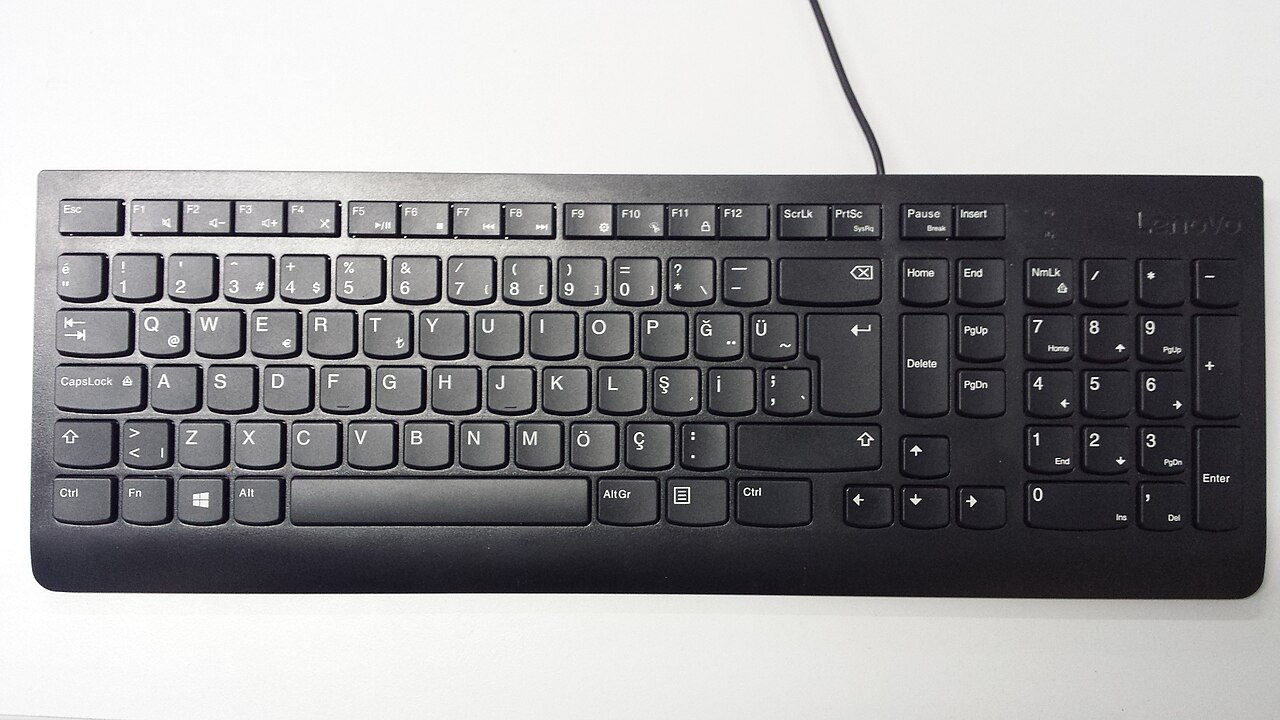
Home keys. Fingers rest on the middle row. The left hand rests on A S D F. The right hand rests on J K L and ;.
The bumps. F and J have a small bump. Your index fingers feel it. Then they know they are home.
Find the middle row. Find the bump on F and on J.Photo: Răzvan Sandu, CC BY-SA 4.0
CheckQuestion 1 of 4
Where do your feet go when you type?
On the computer11 min
Laptop block: Key finder, home keys
Work in pairs. Driver uses the hands. Navigator uses the eyes and the voice.
Sit well first. Put your fingers on the home keys. Feel the bumps on F and J.
Play 1. Home keys. Find the key. Press it with the right finger.
Key finder
On the computer11 min
Laptop block: Key finder, all letters
Swap. Now find any letter. Keep your fingers near home.
Play 2. All letters. Find the letter. Press it. Come back home.
Each colour is one finger. The number on a key tells you the finger.
Which finger?
1 Left little finger
2 Left ring finger
3 Left middle finger
4 Left pointer finger
5 Both thumbs
6 Right pointer finger
7 Right middle finger
8 Right ring finger
9 Right little finger
The bumps on F and J help you find the home keys.
Key finder
Did you know?3 min
Laptop block: Fingers that can see
Louis Braille lived in France. He was blind. As a teenager, he made a way to read with fingertips.
His system uses small raised dots. Each pattern of dots is a letter. Blind people still read this way today.
The bump on F and J works the same way. Your fingers read it without your eyes.
What else can you find by touch alone?
Challenge5 min
Laptop block: Challenge
Choose one challenge. Try the next one when you are ready.
Bronze
Sit well. Put your fingers on the home keys. Show your partner the bumps.
Silver
Play 2. All letters. Press ten keys without looking at the keyboard.
Gold
Type your first name in the text program. Keep your fingers near home. Return home after each letter.
Learn15 min
Paper block: Worksheet 1, the finger colour keyboard
Now you work at your table. Today’s table leader leads the table.
Do Worksheet 1. Colour the keys. Each finger has a colour.
Worksheet 1: My finger colour keyboardName:
A keyboard on paper. Colour the home keys. Each finger has a colour.
Finger
Key
Colour
Left little
A
Pink
Left ring
S
Orange
Left middle
D
Yellow
Left index
F
Green
Right index
J
Blue
Right middle
K
Purple
Right ring
L
Red
Right little
;
Brown
Q
W
E
R
T
Y
U
I
O
P
A
S
D
F
G
H
J
K
L
;
Z
X
C
V
B
N
M
,
.
/
1. Colour each home key with its finger colour.
2. Colour the space bar grey. Both thumbs rest there.
3. Draw a small bump on F and on J.
4. Which key has the blue colour?
5. Which finger rests on J?
6. Which key does your left index finger rest on?
7. Draw yourself sitting well at a laptop. Show your feet, your back, and your hands.
No computer12 min
Paper block: Worksheet 2, words from home keys
Do Worksheet 2. Some words use only home keys. Find them.
Then play Tap the word on your paper keyboard.
Worksheet 2: Words from home keysName:
Home keys: A S D F J K L ;
1. Does the word use only home keys? Circle YES or NO.
Word
Only home keys?
ask
YES or NO
dad
YES or NO
dog
YES or NO
fall
YES or NO
mat
YES or NO
salad
YES or NO
2. Which word in the box is not a home key word? Box: sad, flask, dog.
3. Write 3 words that use only home keys.
4. Write your own word with the home keys. Say it aloud.
5. Which word means every one? It uses the keys A, L, and L.
6. Tap each word on your paper keyboard. Tick when done.
ask
dad
fall
flask
salad
Wan Bene moment5 min
Paper block: Say it at the table
Go round the table. Each person says two sentences.
“The home keys are … . My fingers rest on … .”
Speak so the person farthest from you can hear.
Exit question8 min
Paper block: Exit question
Show with your fingers.
Which two keys have a small bump?
A and L
F and J
S and K
Then say: “Today I learned … .”
Home mission5 min
Home mission
Paper (everyone). Make a paper keyboard on a card. Draw the middle row. Write three words with only home keys. Tap them with your fingers. Show someone at home how to sit well.
Phone (only if a family phone is free, and you have asked). Open a notes or message page. Type three words with home keys. Sit well while you type. Show someone at home.